
Contents
Order Returns Process
Badger offers order return services, only for orders originally shipped by Badger. Products returned to Badger's warehouse will be inspected and returned to inventory if in good condition; product deemed "used" or damaged will be disposed of.
Clients manage return shipping labels directly with customers (Badger does not offer return shipping labels). For freight returns, clients can request Badger schedule a freight pickup under Operations, in the Help Center.
If you'd like Badger to manage your customer order returns, return products to Badger's address:
Badger Fulfillment
13 Dogs Way
Harvard, IL 60033
Required Customer Return Information
Returned orders are required to have the following information clearly displayed on the outside of all parcels (or pallets); include this information on the shipping label / Bill of Lading, or instruct customers to write or affix this information on the outside of the packaging:
- Original Store Order Number (or Shipment Order Code)
- Customer Full Name
For small parcel order returns, clients do not need to notify Badger (no Purchase Order required); these packages are automatically checked back in under the original order number - displayed on the package.
For freight (pallet) returns, enter a Purchase Order in your dashboard (similar to inbounding product); designate "[Order #] - Order Return" in the PO Number field.
Clients are not notified of small parcel order returns (including "RTS"); monitor the 'Return Orders' report in your dashboard to track order return status. Badger does not offer photos / documentation for damaged or used products; these products are automatically disposed of, at the sole discretion of Badger.
Order returns are typically processed within 5 business days (product put back to inventory and available for order fulfillment). Holidays and Peak Season (October 1st - January 31st) may affect this time to restock.
Consumer Packaged Goods (CPG)
In accordance with our GMP regulations and best practices, many Consumer Packaged Goods are not permitted to get returned to inventory, due to health, hygiene, and safety matters, regardless of condition. For this reason (regarding CPG products), Badger recommends clients manage customer returns in house or instruct customers to dispose or keep unwanted items.
Example CPG Products:
- Food / snacks
- Supplements
- Beverages
- Hygiene products
- Household products (cleaning and sanitary products)
- Cosmetics / makeup
- Medicine
- Sealed products with expiration
Return to Sender (RTS)
Return to Sender (or RTS), describes an order that is sent back to Badger's warehouse because it couldn't be delivered, usually because the address is wrong / missing information, the customer moved, or the package was refused. Products will automatically get inspected and returned to inventory if in original / good condition (including CPG).
Replacement Orders
Clients are responsible for entering replacement orders (in their connected ecommerce store or in their Dashboard).
View 'Return Orders' Report
When product gets checked back in at Badger's warehouse, order / SKU information can be viewed in your Dashboard ('Return Orders' report).
Dashboard -> Inventory -> Return Orders
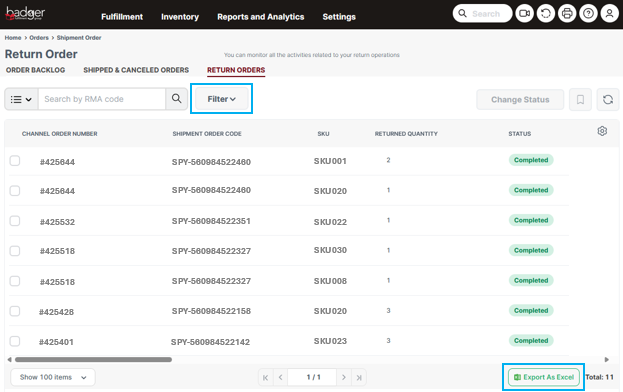
The report lists one line item per SKU received; you can reference the original store Order Number, SKU, Returned Quantity, Customer Name, and [return] Status.
Use the 'Filter' button to filter the report by specific order or product data.
Export this report to an Excel file by selecting the 'Export As Excel' button on the bottom toolbar.