
Enable Inventory Sync in Shopify
Once integrated, if you want Badger inventory quantities to sync to your Shopify store, be sure to select the Badger location under the "Inventory" section on each product page. You can add the Badger location before inventory is received—available quantities will simply display as zero until products arrive.
Example Shopify Product Page
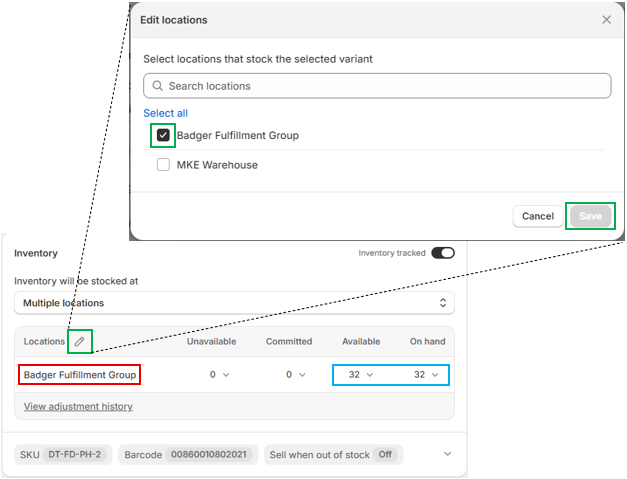
If you need to manually add or adjust inventory, please use a different location ID, as any changes made under the Badger location will be overwritten by our system.
Inventory Sync
Inventory quantities in your Dashboard update in real time as products are received and orders are allocated, picked, packed, and shipped.
Dashboard inventory quantities automatically sync to Shopify approximately every 15 minutes. You can view the synced inventory quantities directly within Shopify Inventory.
Inventory marked On Hold or Damaged in your Dashboard is not included in available inventory and will not sync to Shopify as Available inventory.