
A "Store Product" is a product listing that is created in an ecommerce platform, such as Shopify.
A "Product" may represent a single physical item (Product), or a combination of items ordered together (Kit).
Once your store is connected, active Products automatically download to your Products Dashboard.
New Products download for the first time at 12:00am CST; keep this in mind when planning inbound Purchase Orders with regards to Badger's minimum Advanced Shipment Notice requirement.
Within your store "Product Page":
- Assign SKUs and barcodes. A SKU must be assigned for the Product to download. The barcode is the physical scannable barcode displayed on the outside of the product packaging, required to be scanned during receiving and fulfillment.
Example (Shopify):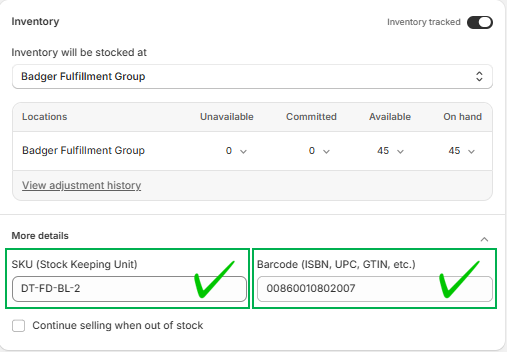
Finalize SKUs prior to assigning in Product pages. Once a SKU downloads to your Dashboard, any updates made to the Product in your store, must be manually made to the corresponding Product in your Dashboard.
- If you are shipping internationally, input accurate customs info (i.e. HS Tariff Code and Country Code of Origin), as this data is essential for shipping label generation. This info can be managed directly in your Products Dashboard as well.
Example (Shopify):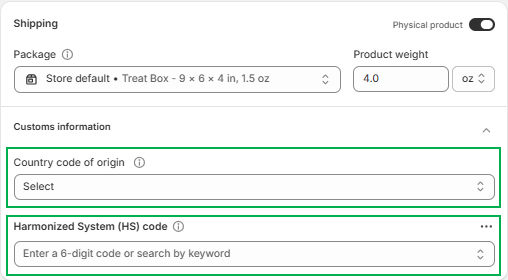
- The status must be “active” (vs. "draft"), in order for the Product to download to your Dashboard.
Example (Shopify):
After Products download, you must complete the following steps in your Dashboard, prior to including the SKUs on any Purchase Order or Shipment Order.
For Product-SKUs:
-
Confirm / Update the Primary Unit of Measure.
-
Add Pack Types, if applicable.
- Add Custom Declarations, if you are shipping internationally.
For Kit-SKUs:
- Configure Kit SKU with components.