
Contents
What is a SKU?
A "Stock Keeping Unit" (SKU) is a unique alphanumeric code, used to identify and track products in an inventory / order management system. A SKU may represent a single physical item, or a combination of items ordered together ("Kit").
Any physical product intended to be received and managed in Badger’s warehouse, requires a corresponding SKU assigned in the WMS (including inserts, stickers, samples, packaging, marketing or project materials, components, etc.).
In order for a product to be inventoried in Badger's Warehouse Management System (WMS), a SKU and Name must be defined at minimum. Although some products may not have a corresponding sales channel-listing page (i.e. inserts, stickers, or packaging), these items still need to be set up in Badger's WMS with a SKU and Name defined.
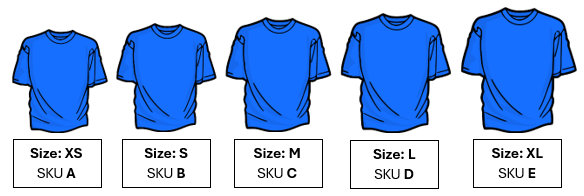
Each product variant needs a unique SKU value assigned.
Example: a 'Plain Blue T-Shirt' that comes in 5 different sizes, needs 5 SKUs - one SKU per size variant:
SKUs are client defined.
Clients can use a SKU format of their preference. Below is an example of a SKU structure for a pet treat company:

SKU DTSBPB6 can quickly be identified as the “6 oz. Soft Baked Peanut Butter Dog Treat”
Tips for SKU management:
- Keep codes short, simple, and understandable.
- Implement a logical hierarchy with your SKU architecture for easy organization; develop a system that includes essential product attributes like brand, color, size, and other relevant features.
- Use the same SKU structure across your products and sales channels.
- Regularly audit SKUs to reflect product changes.
- Avoid using special characters or zeros when possible, as these can cause confusion and software compatibility issues (letter O vs. number 0?)
System Requirements
Badger's Warehouse Management System (WMS) has the following requirements for SKU-code character length (including spaces):
- Minimum SKU character length: 3 characters
- Maximum SKU character length: 16 characters
Try to keep SKU-code length as short as possible (greater than 3 characters); the less data, the better.
SKU-codes with a character length outside of the limits defined above may not sync to Badger's WMS, or may cause system issues.
SKU vs. Barcode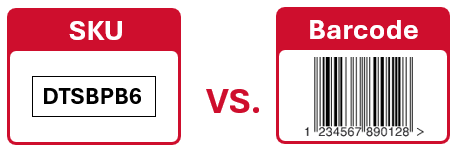
A SKU is a master item code, while a barcode is an associated scannable identification number (the barcode is physically displayed on the outside of the product packaging).
A product SKU may have multiple associated barcodes, however, a barcode can only be associated with one active SKU.
Order Channel Product Listing
Once Badger integrates your order channels (i.e. Shopify), Products will automatically download to the WMS. In order for a channel product listing to sync to the WMS, a SKU value must be assigned in the "product page".
Additionally, input the barcode / UPC in the 'Barcode' field (this is the physical barcode displayed on the outside of the product packaging, required for scanning during receiving and fulfillment).
Example (Shopify):

Kit SKU
A Kit SKU is a product listing that represents a combination of products ordered / shipped together. Examples of popular Kits include: "Best Seller Bundle", "Variety Pack", or "Multi-Pack".
Kit SKUs are configured in the WMS by adding component products / quantities in the WMS.
A kit SKU is considered a phantom item because it’s not physically received into inventory (however, the component SKUs are).
Example 1:
| SKU A | |
| Component SKU | Component Quantity |
| SKU B | 1 |
| SKU C | 1 |
| SKU D | 1 |
In this example, SKUs B, C, & D are the "component" SKUs, for Kit SKU A.
When quantity 1 of Kit SKU A is ordered, SKU B, SKU C, and SKU D (QTY 1 of each), are picked, packed, and shipped together.
When quantity 3 of Kit SKU A is ordered, SKU B, SKU C, and SKU D (QTY 3 of each), are picked, packed, and shipped together.
Example 2:
| SKU A | |
| Component SKU | Component Quantity |
| SKU B | 3 |
In this example, Kit SKU A has one component: SKU B, quantity 3.
When quantity 1 of Kit SKU A is ordered, product SKU B (QTY 3) is picked, packed, and shipped.
When quantity 3 of Kit SKU A is ordered, product SKU B (QTY 9) is picked, packed, and shipped.
Example 3:
| SKU A | |
| Component SKU | Component Quantity |
| SKU B | 1 |
In this example, Kit SKU A has only one component: SKU B, quantity 1.
When quantity 1 of Kit SKU A is ordered, product SKU B (QTY 1) is picked, packed, and shipped.
When quantity 3 of Kit SKU A is ordered, product SKU B (QTY 3) is picked, packed, and shipped.