
Contents
Freight Scheduling
For pallet orders designated as 'Badger Ship', Badger will schedule earliest pickup upon order completion.
For pallet orders designated as 'Collect', clients can proceed scheduling pickup, once WMS order status shows 'Shipped', or based on Badger's confirmed order completion date.
Collect freight shipments should be scheduled for pickup at Badger Warehouse within the following time: 12:00pm - 4:00pm CT, unless otherwise noted or agreed upon.
BOL Overview
Every outbound freight / pallet shipment requires a Bill of Lading (BOL).
The Bill of Lading is a document that contains important shipment info (origin address, destination address, shipment contents etc.), and acts as a receipt / proof of pickup and delivery. The BOL is what freight companies use to document and track shipments from pickup to delivery.
For outbound pallet shipments setup and scheduled by Badger, Badger produces the BOL.
For outbound pallet shipments setup and scheduled by clients or third parties, the client is responsible for supplying the BOL.
Freight shipments will not be loaded without a proper BOL supplied by the time of pickup.
BOL Submission
For BOLs managed by the client (or third party / broker), clients should email BOLs to shipping@badgerfg.com.
BOL file type: 8.5" x 11" PDF format
Each BOL file should be named as the corresponding WMS Order Code (for a single order), or the pickup reference # or BOL # noted on the document (for multiple orders).
Only include required pallet attachments in email, that were not uploaded to the WMS Shipment Order at the time of order entry (e.g. pallet labels, commercial invoice, customs documentation etc.).
BOLs need to be provided prior to date / time of carrier arrival; it is the client's responsibility to understand and note accurate pickup date on the BOL.
Carrier pickup attempts made without a complete and accurate BOL provided by time of carrier arrival may incur a $25 fee / occurrence.
BOL Information
Required outbound BOL information:
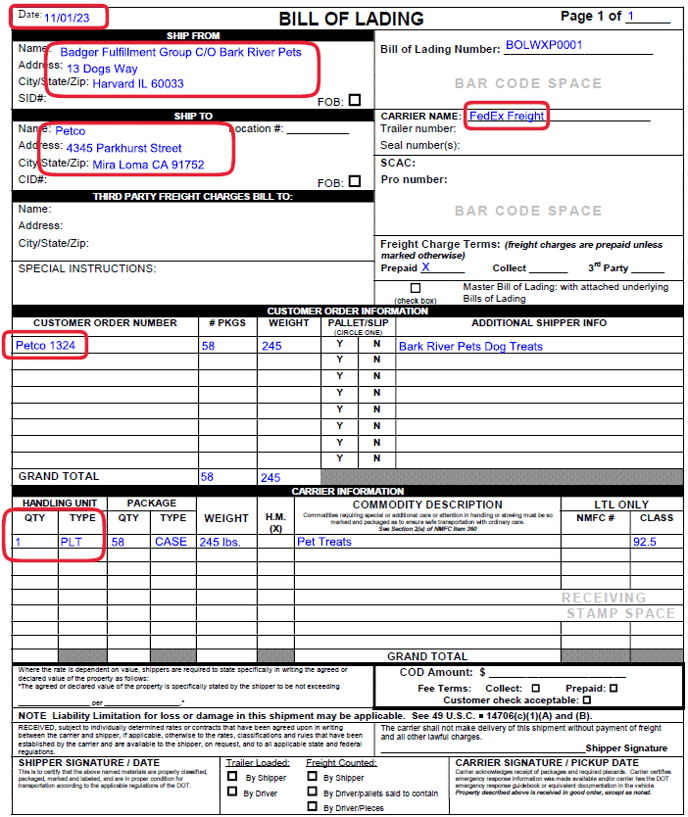
- Pickup company name and address:
Badger Fulfillment Group
C/O Badger Client Name
13 Dogs Way
Harvard IL 60033 - Ship / pickup date
- Full carrier name
- WMS Shipment Order customer address
- WMS Shipment Order Code(s)
- Accurate pallet quantity, weights, and dimensions.
BOL formats / headers may differ, however, fields listed above are required to be noted on document.
Badger client name needs to be referenced on BOL; include in C/O ("care-of") address line, or in reference field.
WMS Order Code(s) need to be clearly listed on BOL (PO line).
Ship to address on BOL needs to match shipment order address in WMS.
Example of complete BOL (client: Bark River Pets):
BOL Receipts
Upon pickup, BOLs are signed by Badger and carrier.
Signed BOLs are scanned and emailed to clients by end of day (carrier pickups typically occur in the afternoon: ~1:00 pm - 4:00 pm CT).
For freight shipments, use BOL receipt as order pickup confirmation.
WMS Shipment Order status may show: Shipped, however, use BOL receipt as official ship status confirmation (for pallet orders).
To update email recipients for BOL receipts, submit the Help Request ticket, via the Ticket Portal.